How to Search for Your Tax Identification Number (TIN) Through MyTax
Not sure what your income tax number is? Whether you are starting a new job, filing your income tax return or preparing an e-Invoice, you may need to provide your Tax Identification Number (TIN).
What Is a Tax Identification Number (TIN)?
A Tax Identification Number (TIN) is a unique number assigned by the Inland Revenue Board of Malaysia (LHDN or HASiL) to identify taxpayers.
It is also commonly called an income tax number or nombor cukai pendapatan.
For individuals, the TIN normally starts with the prefix IG.
For example: IG123456789
Previously, individual income tax numbers used the prefixes SG or OG. These have been replaced with IG, while the existing numeric portion remains unchanged.
Why You Need a TIN
A Tax Identification Number (TIN) is essential for all taxpayers in Malaysia. It is required for:
- Filing income tax returns
- Engaging in business transactions
- Registering for e-Invoicing
- Providing tax information to your employer.
- Other financial and legal purposes
How to Search for Your TIN Using MyTax
Follow these steps to quickly find your TIN using the MyTax Portal:
Step 1: Visit the MyTax Portal
Go to the official MyTax website:https://mytax.hasil.gov.my.
Step 2: Log In to Your Account
- Enter your login credentials (User ID and password).
- If you do not have an account, register by following the instructions on the portal.
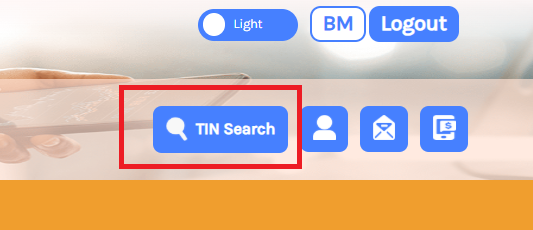
Step 3: Click on ‘Search TIN’
- Once logged in, you will see a ‘Search TIN’ button in the menu bar.
- Click on the ‘Search TIN’ button to proceed.
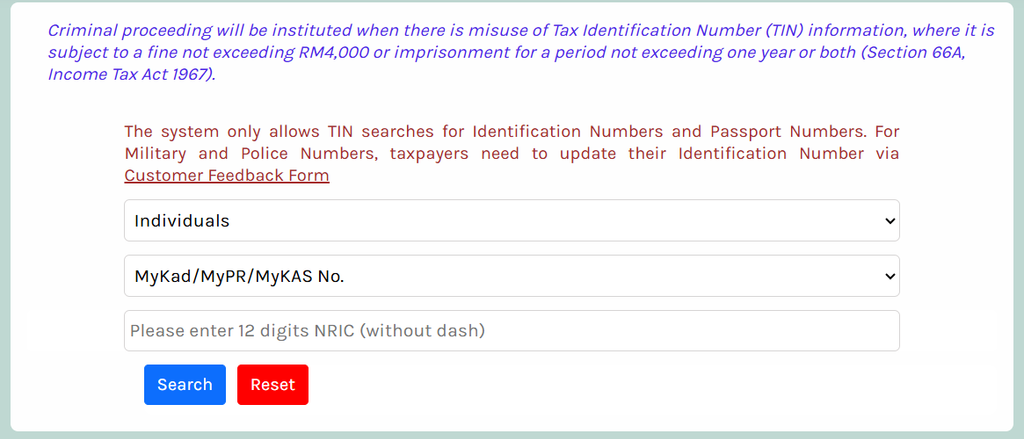
Step 4: Choose the Appropriate Search Option
- You will be prompted to select whether you are searching as an “Individual” or “Other Than Individuals” (e.g., companies). (Refer to Image 2)
- For individuals, enter your Identification Card Number (NRIC) or Passport Number.
- For companies or businesses, enter the Business Registration Number (BRN).
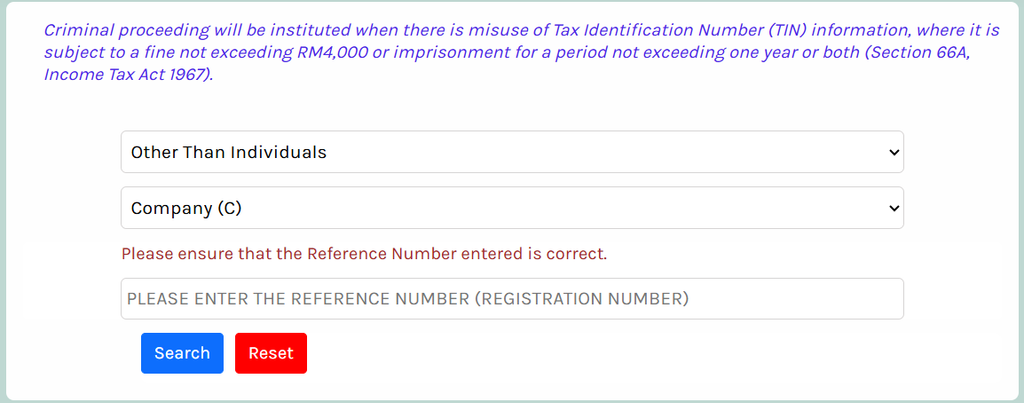
- Click the “Search” button to initiate the search.
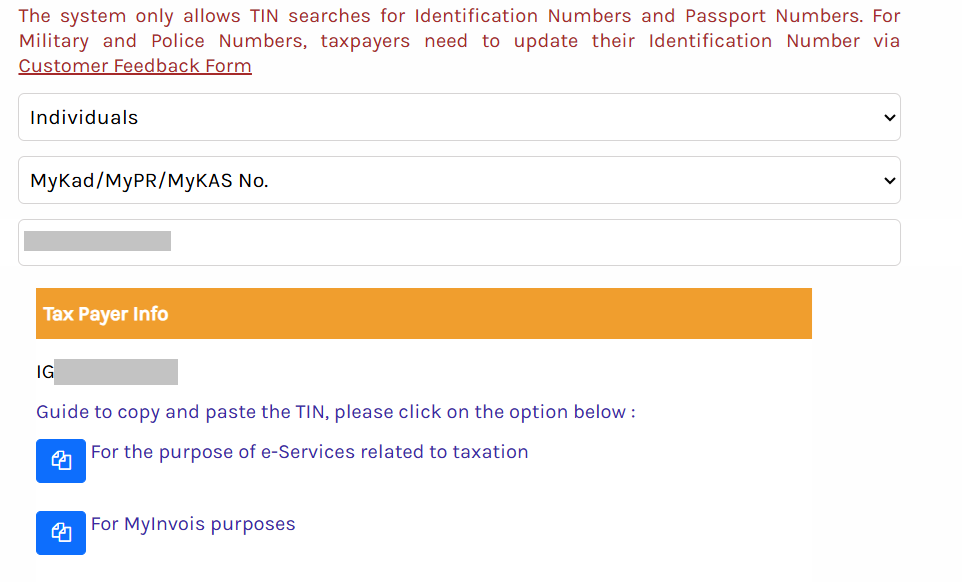
Step 5: Copy Your TIN
- The search result provides an option to copy the TIN for specific uses, such as e-Services related to taxation or for e-Invoice purposes.
Other Method: Check Your TIN Using MyDigital ID
Malaysian citizens who have activated MyDigital ID can use the MyDigital ID verification option available through MyTax.
To check your TIN:
- Visit the MyTax portal.
- Look for the Carian TIN / MyDigital ID option.
- Follow the MyDigital ID identity verification instructions.
- Check your TIN after successful verification.
Important: This option is available to Malaysian citizens with an activated MyDigital ID. It is not currently intended for foreign passport holders.
How to Register for a TIN if You Don’t Have One
If your TIN cannot be found and LHDN confirms that you are not registered, you may need to apply through e-Daftar.
Follow these steps:
- Visit https://mytax.hasil.gov.my.
- Access the e-Daftar service.
- Select the appropriate taxpayer category.
- Complete the registration details.
- Upload any supporting documents required.
- Submit your application and follow the instructions provided.
Since 1 January 2024, individual TIN registration applications have generally been made online through e-Daftar.
Foreign individuals who are not automatically registered may need to apply through this service.
How Can Foreign Employees Check Their TIN?
Foreign employees working in Malaysia may also have a Malaysian TIN.
If you have previously worked in Malaysia or filed income tax, you may already have one.
You can:
- Search using your passport number through MyTax.
- Check your previous Malaysian tax records.
- Contact the HASiL Contact Centre.
- Visit an LHDN branch for assistance.
If you have changed your passport, your previous passport number may still be recorded in LHDN’s system.
Contact LHDN if you cannot find your TIN using your current passport number.
Do not register for another TIN without checking whether you already have an existing tax file.
FAQs About TIN Number
Q: When did the TIN format change?
A: The change (SG/OG → IG for individuals, addition of “0” for non-individuals) took effect on 2 January 2023.
Q: Do I need a TIN even if I’m a foreigner or non-resident?
A: Yes, if you have tax obligations in Malaysia. Use your Passport Number or other identifier. Contact HASiL if unsure.
Q: What is the difference between NRIC and TIN?
A: The NRIC is your identification number (for citizens / permanent residents). It may act as a functional equivalent for tax identification when TIN is not formally issued. But the official TIN is what HASiL uses in the tax system.
Q: Can the TIN be used for e-Invoicing?
A: Yes. For e-Invois / e-invoicing systems, your TIN is required, especially for business or entity roles. Ensure you’re using the updated TIN format.
Q: How do I contact HASiL for help?
A: HASiL Care Line: +603-8911 1000 / +603-8911 1100. HASiL Live Chat via official portal. Nearest HASiL branch. Customer feedback / official forms.
Conclusion
The TIN search function on the MyTax portal offers a quick and efficient way for individuals and businesses to retrieve their tax identification numbers. By following the steps outlined above, you can ensure compliance and ease in managing your tax-related activities. For further details, always refer to the official announcements by LHDN or consult a tax professional if needed.
