
Form EA and Form E in Malaysia: Complete Guide for Employees and Employers (2027)
Every year, employers in Malaysia must prepare annual tax documents for their employees and submit employment income information to the Inland Revenue Board of Malaysia (LHDN).
Two important documents are Form EA and Form E. Although their names are similar, they serve different purposes.
Form EA is issued to employees to help them prepare their personal income tax returns. Form E, on the other hand, is submitted by employers to LHDN to report their employees’ remuneration for the year.
Employers also need to understand Form CP8D, which contains detailed remuneration information for individual employees.
This guide explains the differences between Form EA, Form E and CP8D, their deadlines, and what employees and employers need to do for remuneration earned in 2026 and reported in 2027.
What Is the Difference Between Form EA, Form E and CP8D?
Here is a quick comparison:
Form EA | Form E | Form CP8D | |
|---|---|---|---|
Purpose | Annual income statement for employees | Annual employer declaration | Detailed employee remuneration information |
Prepared by | Employer | Employer | Employer |
Given or submitted to | Employee | LHDN | LHDN |
Information | Individual employee’s remuneration details | Employer’s annual employment information | Employee-by-employee remuneration details |
Deadline for 2026 remuneration | 28 February 2027 | 31 March 2027 | 31 March 2027 |
Submission method | Given to employees | MyTax e-Filing | e-CP8D / e-Data Praisi or applicable MyTax submission method |
Note: The deadlines above follow the standard statutory filing cycle. Any extension or changes announced by LHDN for 2027 should be checked before submission.
The main difference is simple:
- Form EA helps employees prepare their personal income tax returns.
- Form E is the employer’s annual return to LHDN.
- Form CP8D provides LHDN with the detailed remuneration information of individual employees.
Completing one document does not automatically mean all the employer’s annual reporting obligations have been fulfilled.
What Is Form EA in Malaysia?
Form EA, officially known as Form C.P.8A, is an annual statement of remuneration prepared by employers for their employees.
It summarises the income received and certain deductions made during the calendar year.
For example, the Form EA issued in February 2027 will generally contain employment remuneration for the year ended 31 December 2026.
Employees use the information in Form EA when preparing their personal income tax returns, such as Form BE.
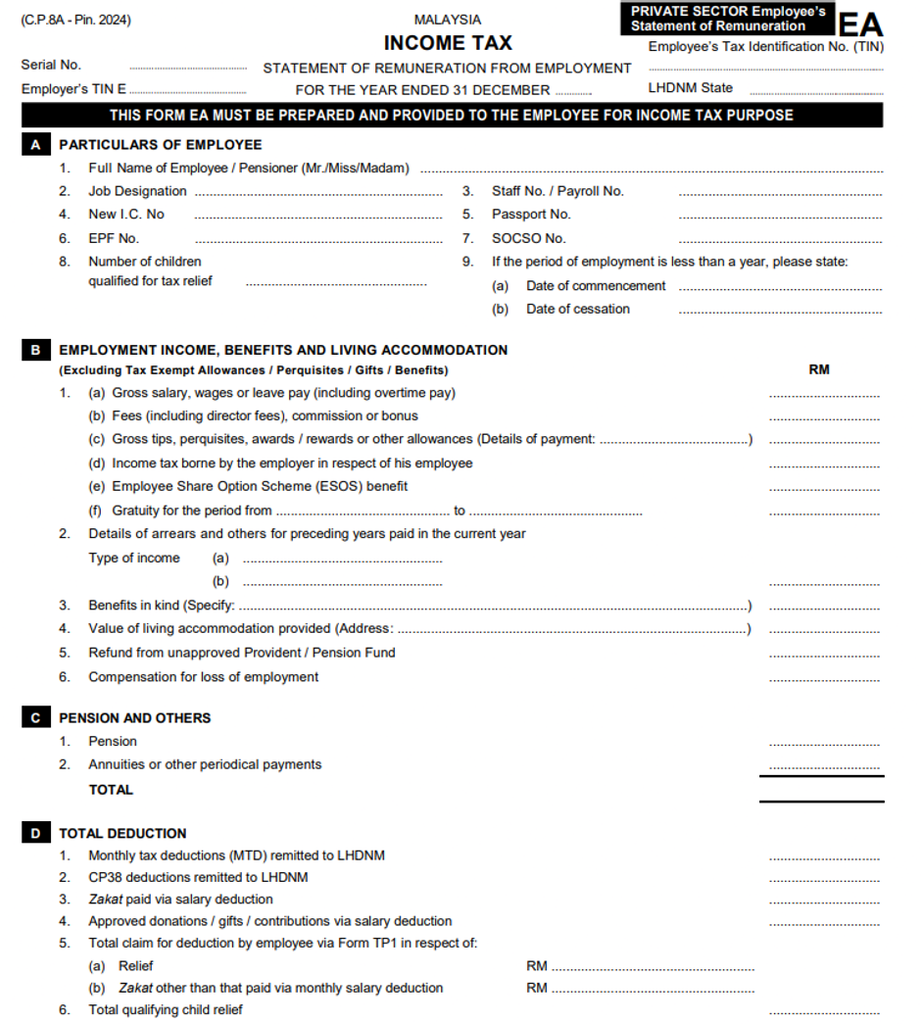
Download the latest Form EA here:
What Information Is Included in Form EA?
Form EA contains several sections covering employment income and deductions.
1. Employee information
This includes the employee’s name, identification number, tax identification number (TIN), employee number and employment dates, where applicable.
2. Employment income
Examples include:
- Basic salary and wages
- Overtime payments
- Bonuses and commissions
- Taxable allowances and perquisites
- Director’s fees, where applicable
- Income tax borne by the employer
- Benefits-in-kind (BIK)
- Value of living accommodation (VOLA)
- Gratuity and compensation for loss of employment
3. Tax deductions and other payments
Form EA also includes relevant information such as:
- Monthly Tax Deduction (MTD/PCB)
- CP38 deductions
- Zakat deducted through payroll
- Approved donations or contributions deducted through payroll
- Certain employee tax relief information submitted through Form TP1
4. Statutory contributions
The form includes qualifying employee contributions to approved provident or pension funds and SOCSO.
5. Tax-exempt allowances and benefits
Certain tax-exempt allowances, perquisites and benefits are reported separately from taxable employment income.
Employers must classify each payment correctly according to the applicable tax rules.
Who Should Receive Form EA?
Employers should prepare Form EA for employees covered by the annual remuneration statement requirement.
This generally includes:
- Permanent employees
- Contract employees
- Part-time employees
- Employees who resigned during the year
- Employees who joined during the year
- Employees who received taxable employment remuneration
- Interns
Employers should not assume that Form EA is unnecessary simply because an employee worked for only a short period or had no PCB deductions.
When Must Employers Issue Form EA?
Under the normal statutory requirement, employers must provide Form EA to employees by the last day of February of the following year.
For remuneration earned in 2026, the deadline is 28 February 2027.
Form EA is given to the employee and is not normally submitted separately to LHDN by the employer.
Employers may provide Form EA as a printed document or an electronic copy, such as a PDF.
What Should Employees Do After Receiving Form EA?
Employees should check their Form EA before using it for income tax filing.
Pay attention to the following:
- Check your name, IC number and TIN.
- Make sure your annual salary and bonuses are correct.
- Check whether allowances and benefits have been reported correctly.
- Compare the PCB amount with your payslips or payroll records.
- Review the EPF and SOCSO contributions shown.
- Contact HR or payroll if any information appears incorrect.
Example:
Ali worked for Company A from January to June 2026 and joined Company B in July 2026.
He should receive a Form EA from Company A and another Form EA from Company B.
When preparing his personal income tax return for YA 2026, Ali must take into account the relevant employment income from both employers.
He should not declare only the income from his latest employer.
What If Your Employer Has Not Given You Form EA?
Employees should first contact their HR or payroll department and request a copy.
If the employer has ceased operations or cannot be contacted, employees should gather their payslips, annual payroll records and PCB information to support their tax filing, and seek clarification from LHDN where necessary.
Employees should not simply omit employment income because Form EA has not been received.
What Is Form E in Malaysia?
Form E is the annual return submitted by employers to LHDN.
It reports employment-related information for the preceding calendar year.
Unlike Form EA, which is prepared separately for each employee, Form E is an employer-level declaration.
Employers submit Form E electronically through MyTax using the e-E service.
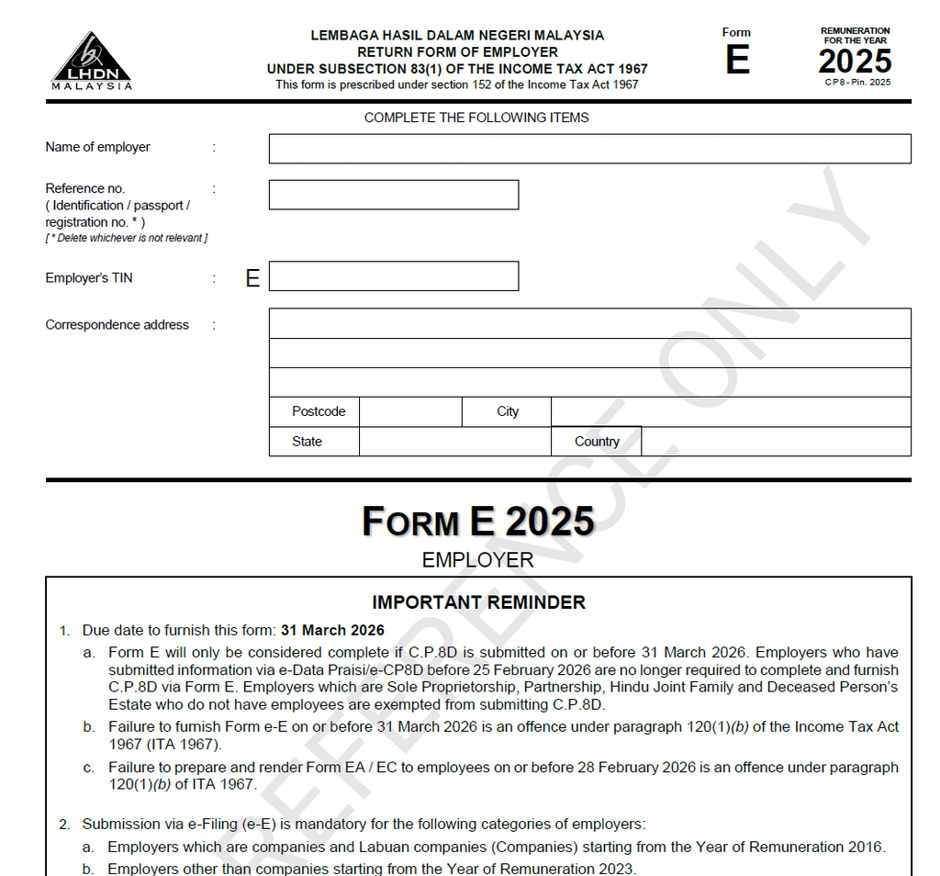
Download the latest Form E here:
Who Must Submit Form E?
Form E filing requirements apply to employers in Malaysia, including relevant businesses and organisations such as:
- Private limited companies (Sdn Bhd)
- Public limited companies (Berhad)
- Sole proprietorships with employees
- Partnerships with employees
- Limited liability partnerships (LLPs)
- Other organisations with employer reporting obligations
Companies and certain other entities may still be required to submit Form E even if they have no employees or are dormant.
Employers should check the latest LHDN Form E explanatory notes rather than assume that no payroll means no filing requirement.
What Information Is Reported in Form E?
Form E contains information about the employer and the number of employees during the reporting year.
The form is divided into several sections:
1. Employer’s Basic Particulars
This section includes:
- Employer’s registered name and Tax Identification Number (TIN)
- Employer category, such as company, government or other organisation
- Employer status, such as active, dormant or winding up
- Business registration or identification number
- Correspondence address and contact details
- CP8D submission status
2. Part A: Information on Number of Employees
Employers must report the following information:
- A1: Number of employees as at 31 December
- A2: Number of employees subject to Monthly Tax Deduction (MTD/PCB)
- A3: Number of new employees during the year
- A4: Number of employees who ceased employment or died during the year
- A5: Number of employees who ceased employment and left Malaysia
- A6: Whether the employees reported under A5 were reported to LHDN
3. Part B: Particulars of Tax Agent
If a tax agent completes the return, this section records the tax agent’s details, including name, approval number, firm information and signature.
4. Part C: Declaration
The employer must declare that the information submitted is true, complete and correct.
Does Form E Include Employees’ Salary and PCB Details?
No. Form E itself does not contain individual employees’ salary, bonus, allowance or PCB amounts.
These details are reported separately through Form CP8D, which contains employee-level remuneration information.
Employers must ensure that the required CP8D information has been submitted for Form E to be considered complete, unless an applicable exemption applies.
Employers who have already submitted the required information through e-Data Praisi or e-CP8D within the prescribed period do not need to submit the same CP8D information again.
What Is the Deadline for Form E?
The standard deadline for submitting Form E is 31 March of the following year.
For remuneration paid in 2026, the normal filing deadline is 31 March 2027.
LHDN may announce specific administrative concessions or filing extensions in its annual filing programme.
However, employers should not assume that an extension granted in a previous year will automatically apply in 2027.
It is advisable to complete Form E before 31 March rather than wait until the last day.
What Is Form CP8D?
Form CP8D is an annual statement containing detailed remuneration information for individual employees.
While Form E provides the employer-level declaration, CP8D supplies the employee-level details needed by LHDN.
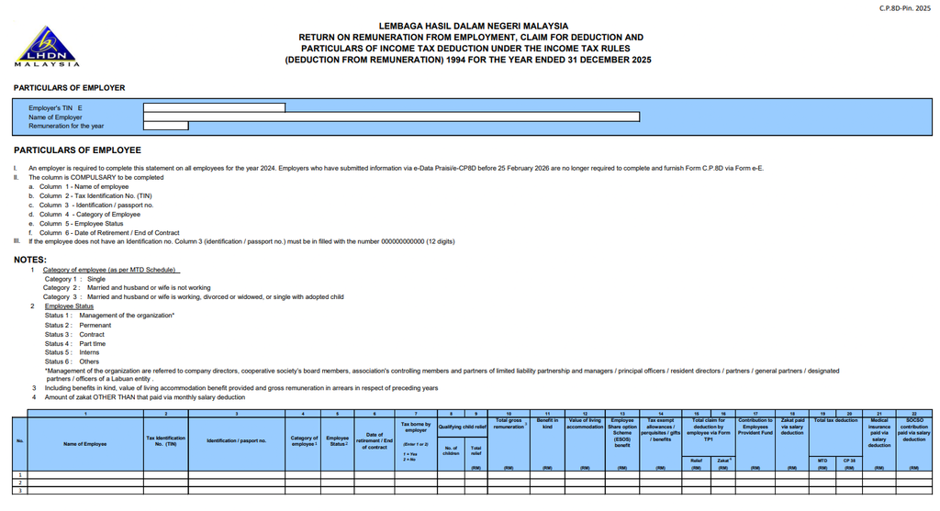
What Information Is Included in CP8D?
The information generally includes:
- Employee’s name
- Identification number or passport number
- Tax identification number
- Employment remuneration
- Taxable benefits and allowances
- PCB deductions
- Other information required under LHDN’s current CP8D specification
The exact fields and file layout depend on the format prescribed by LHDN for the relevant reporting year.
Is CP8D Compulsory?
Yes. Form E is considered complete only when the required CP8D remuneration information has also been submitted.
However, employers who have successfully submitted the relevant remuneration information through LHDN’s e-Data Praisi facility do not need to submit the same CP8D information again.
Employers should retain their submission acknowledgement and check that the data was accepted successfully.
What Is e-Data Praisi?
e-Data Praisi is an LHDN facility that allows employers to submit employees’ remuneration information electronically.
One of its main purposes is to pre-fill employment income information in employees’ electronic income tax returns.
This can make tax filing easier for employees because certain employment income details are already populated in their e-Filing forms.
However, employees must still review the pre-filled information before submitting their tax returns.
e-Data Praisi vs CP8D: What Is the Difference?
Both involve employee remuneration information, but the submission timing and purpose are important.
Item | e-Data Praisi | CP8D |
|---|---|---|
Main purpose | Early remuneration submission for tax return pre-filling | Employee remuneration reporting for Form E |
Submitted by | Employer | Employer |
Normal timing | 1 January to 25 February | By 31 March |
Employee tax return pre-filled? | Yes, if accepted within the applicable period | Not necessarily |
Must submit again with Form E? | No, if the required data was successfully submitted | Required where no qualifying prior submission exists |
Important: Employers who submit remuneration information after the pre-filling period may still fulfil their annual reporting obligations, but the information may not be automatically pre-filled into employees’ tax returns.
The employer must still submit Form E separately.
Form EA, Form E and CP8D Deadlines for 2027
For employers preparing annual tax documents for remuneration earned in 2026, the following dates should be included in the payroll year-end schedule.
Document or process | Standard deadline |
|---|---|
e-Data Praisi submission for pre-filling | 25 February 2027 |
Issue Form EA/EC to employees | 28 February 2027 |
Submit Form E through MyTax | 31 March 2027 |
Submit CP8D, where required | 31 March 2027 |
These dates are based on the standard reporting requirements and established LHDN submission procedures.
Employers should check the official 2027 filing programme for any updated instructions, filing arrangements or extensions.
How to Prepare Form EA and Form E: A Guide for Employers
Preparing annual tax documents involves more than generating a report from the payroll system.
Employers should first make sure that their payroll records for the year are complete and accurate.
Step 1: Finalise the Annual Payroll Records
Make sure all payroll transactions for the reporting year have been processed.
These may include:
- Monthly salaries
- Bonuses and commissions
- Overtime payments
- Allowances and reimbursements
- Benefits-in-kind
- Taxable perquisites
- Employee resignations and final payments
- Additional payroll adjustments
Step 2: Reconcile Payroll and Statutory Records
Compare the annual payroll figures with the relevant statutory reports.
Important items include:
- Annual gross remuneration
- Employee EPF contributions
- SOCSO contributions
- PCB deductions and remittances
- CP38 deductions
- Zakat deductions
- Taxable and tax-exempt benefits
Example:
If the payroll system shows RM6,000 in annual PCB deductions for an employee, but the employer’s LHDN payment records show a different amount, the discrepancy should be investigated.
Do not simply change the Form EA figure to match one report without checking the reason.
Step 3: Check Employee Information
Before generating the annual forms, verify employee particulars such as:
- Full name
- IC or passport number
- Tax identification number
- Employment commencement date
- Employment cessation date, where applicable
Incorrect employee information can cause problems when submitting remuneration data or when employees file their personal income tax returns.
Step 4: Generate Form EA
Once the payroll information has been checked, generate the Form EA for each relevant employee.
Review the information before distributing the forms.
For employers managing a large workforce, a payroll system can help generate Form EA statements in bulk.
However, the employer remains responsible for ensuring that the information is correct.
Step 5: Prepare CP8D Remuneration Information
Prepare the employee remuneration information according to LHDN’s prescribed CP8D format.
Employers using payroll software may be able to generate the required submission file.
Before uploading, check the employee details, remuneration figures and file format.
Step 6: Submit the Remuneration Information
Employers may submit the information through the applicable MyTax facility.
Where the e-Data Praisi facility is used within the specified period, accepted remuneration information may be pre-filled into employees’ income tax returns.
Otherwise, employers should follow the applicable CP8D submission procedure.
Keep the submission acknowledgement for future reference.
Step 7: Submit Form E Through MyTax
To submit Form E:
- Log in to the officialMyTax portal.
- Access the appropriate employer e-Filing service.
- Select Form e-E for the relevant reporting year.
- Review and complete the employer information.
- Complete the required declarations.
- Submit Form E electronically.
- Save the acknowledgement or submission confirmation.
Employers should make sure that the required CP8D remuneration information has also been successfully submitted.
Step 8: Keep Proper Records
After completing the annual reporting process, retain the relevant records, including:
- Copies of Form EA
- Form E submission confirmation
- CP8D submission records
- Annual payroll reports
- PCB payment records
- Supporting documents for payroll adjustments
These records may be required for future checks, corrections or tax audits.
Common Mistakes When Preparing Form EA and Form E
Even experienced payroll teams can make mistakes during annual tax reporting.
Here are some common issues employers should watch out for.
1. Missing Employees Who Resigned During the Year
Some employers generate Form EA only for employees who are still active in December.
This can result in resigned employees being left out.
What to do: Make sure the annual payroll report includes all relevant employees who received remuneration during the reporting year, including those who resigned.
2. Incorrect PCB Amounts
The PCB amount in Form EA should be checked against the employer’s payroll and tax remittance records.
Differences may arise from payroll corrections, adjustments or incorrect deductions.
What to do: Perform an annual PCB reconciliation before finalising Form EA and CP8D.
3. Missing Bonuses or Additional Payments
Annual bonuses, commissions, taxable allowances and other payments may be missed if they were processed outside the normal monthly payroll.
What to do: Review all regular and additional payroll transactions for the year.
4. Incorrect Treatment of Benefits and Allowances
Not all allowances and benefits receive the same tax treatment.
For example, certain benefits may be taxable, while others may qualify for exemptions subject to LHDN conditions.
What to do: Review the applicable tax treatment before classifying payments as taxable or tax-exempt.
5. Using the Wrong Reporting Year
Employers sometimes confuse the payroll month with the year in which remuneration is treated as received for tax purposes.
This is particularly important for salary arrears, bonuses and payments made around year-end.
What to do: Check the relevant tax rules and actual payment arrangements rather than automatically relying on the payroll period.
6. Assuming Form E Submission Is Enough
Submitting Form E without completing the required CP8D remuneration reporting may leave the annual employer return incomplete.
What to do: Confirm that both the employer declaration and the required employee remuneration information have been accepted.
7. Waiting Until the Last Day
Last-minute submissions can be delayed by incorrect data, rejected files or technical problems.
What to do: Finalise payroll reconciliation early and submit the required information before the deadline.
Frequently Asked Questions About Form EA and Form E
1. Is Form EA compulsory in Malaysia?
Employers are required to prepare and provide annual remuneration statements for employees covered by the applicable reporting requirements.
Employees should receive the relevant Form EA or EC by the last day of February of the following year.
2. Does an employee need to submit Form EA to LHDN?
No. Form EA is issued by the employer to the employee.
Employees use the information when preparing their personal income tax returns and should retain the form for their records.
3. What is the difference between Form EA and Form BE?
Form EA is the annual remuneration statement prepared by the employer.
Form BE is the personal income tax return used by individuals without business income who are required to file that return.
The employee uses information from Form EA when completing Form BE.
4. Do employees who resigned need Form EA?
Yes, where the employee falls within the annual remuneration statement requirements.
Employers should include the relevant remuneration received before the employee’s cessation of employment.
5. What if an employee worked for two companies during the year?
The employee may receive separate Form EA statements from both employers.
When filing their personal income tax return, the employee should account for the relevant employment income from both companies.
6. Is Form EA required if no PCB was deducted?
Having no PCB deduction does not automatically mean that an employee is excluded from the annual remuneration statement requirements.
The employer should assess the reporting obligation based on the employee’s employment and remuneration details.
7. Is Form E compulsory for a dormant company?
Companies and certain other entities may still have Form E filing obligations even if they are dormant or have no employees.
Employers should refer to LHDN’s latest Form E explanatory notes for the relevant year.
8. Can employers submit Form E manually?
Employers are generally required to submit Form E electronically through MyTax using the e-E facility.
9. What happens if Form E is submitted without CP8D?
LHDN generally considers Form E complete only when the required CP8D remuneration information has been submitted.
An employer who has already successfully submitted the relevant information through e-Data Praisi does not need to duplicate the CP8D submission.
10. What if an employee finds an error in Form EA?
The employee should inform the employer’s HR or payroll department.
The employer should review the payroll records and issue a corrected Form EA where necessary.
If incorrect remuneration information has already been submitted to LHDN, the employer should also follow the applicable correction procedure.
11. Can employers issue Form EA electronically?
Yes. Employers may provide Form EA electronically, such as through a PDF document or an employee self-service portal, provided employees can access their statements.
12. Can payroll software generate Form EA and CP8D?
Yes. Payroll software such asCentralHR can help employers prepare Form EA statements, annual payroll reports and CP8D submission files.
However, employers should ensure that the software’s output follows the applicable LHDN requirements and that all information is accurate.
How CentralHR Can Help with Form EA, Form E and CP8D
Preparing annual tax documents can be time-consuming, especially for employers managing many employees, different payroll components or multiple companies.
CentralHR provides payroll outsourcing services in Malaysia to help employers manage monthly payroll processing, statutory deductions and year-end payroll reporting.
Ourpayroll services include:
- Monthly payroll processing
- EPF, SOCSO, EIS and PCB calculations
- Payroll reports and statutory reconciliation
- Preparation of employee Form EA statements
- Preparation of annual remuneration information for CP8D
- Form E submission support
- Employee payroll records and payslip management
By keeping payroll records organised throughout the year, employers can reduce errors and make annual tax reporting more manageable.
Need help with payroll processing or annual tax reporting?
Learn more about CentralHR Payroll Outsourcing Services or contact our team to discuss your payroll requirements.
Conclusion
Form EA, Form E and CP8D are important parts of annual payroll tax reporting in Malaysia.
For employees, Form EA provides the employment income and deduction information needed for personal income tax filing.
For employers, Form E and CP8D help fulfil their annual reporting responsibilities to LHDN.
The key to a smooth filing process is to maintain accurate payroll records, reconcile statutory deductions and prepare the required documents before the deadlines.
For remuneration earned in 2026, employers should plan to issue Form EA by 28 February 2027 and submit Form E with the required remuneration information by 31 March 2027, subject to any official LHDN updates.
Preparing early will help both employers and employees avoid unnecessary mistakes during the tax filing season.
Last updated: 16 November 2026
Disclaimer: This article provides general information on Malaysia’s annual employment remuneration reporting requirements. Employers and employees should refer to the latest LHDN guidelines for the applicable reporting year.
